
Thank You, Mediaket! DiskRaptor Gets a Step-by-Step Tutorial in English, French and Arabic
Thank you to Mediaket Tutorials for a genuinely patient, beginner-friendly guide to DiskRaptor! The tutorial opens with a promise we care about — that no technical knowledge is needed — and then actually keeps it, walking through installation, scanning, the charts and the cleanup tools one numbered step at a time. It is also available in French and Arabic.
Starting from zero
Rather than assuming the reader already knows what a disk analyzer does, the guide starts with the download itself: the .exe installer on Windows, the .dmg or .pkg on macOS, and the .deb package on Debian and Ubuntu-based Linux systems. From there it explains both ways to begin a scan — dragging a folder straight onto the window, or using the file picker, including the handy trick of separating several paths with a semicolon to scan more than one location at once.
The interface, explained in plain language
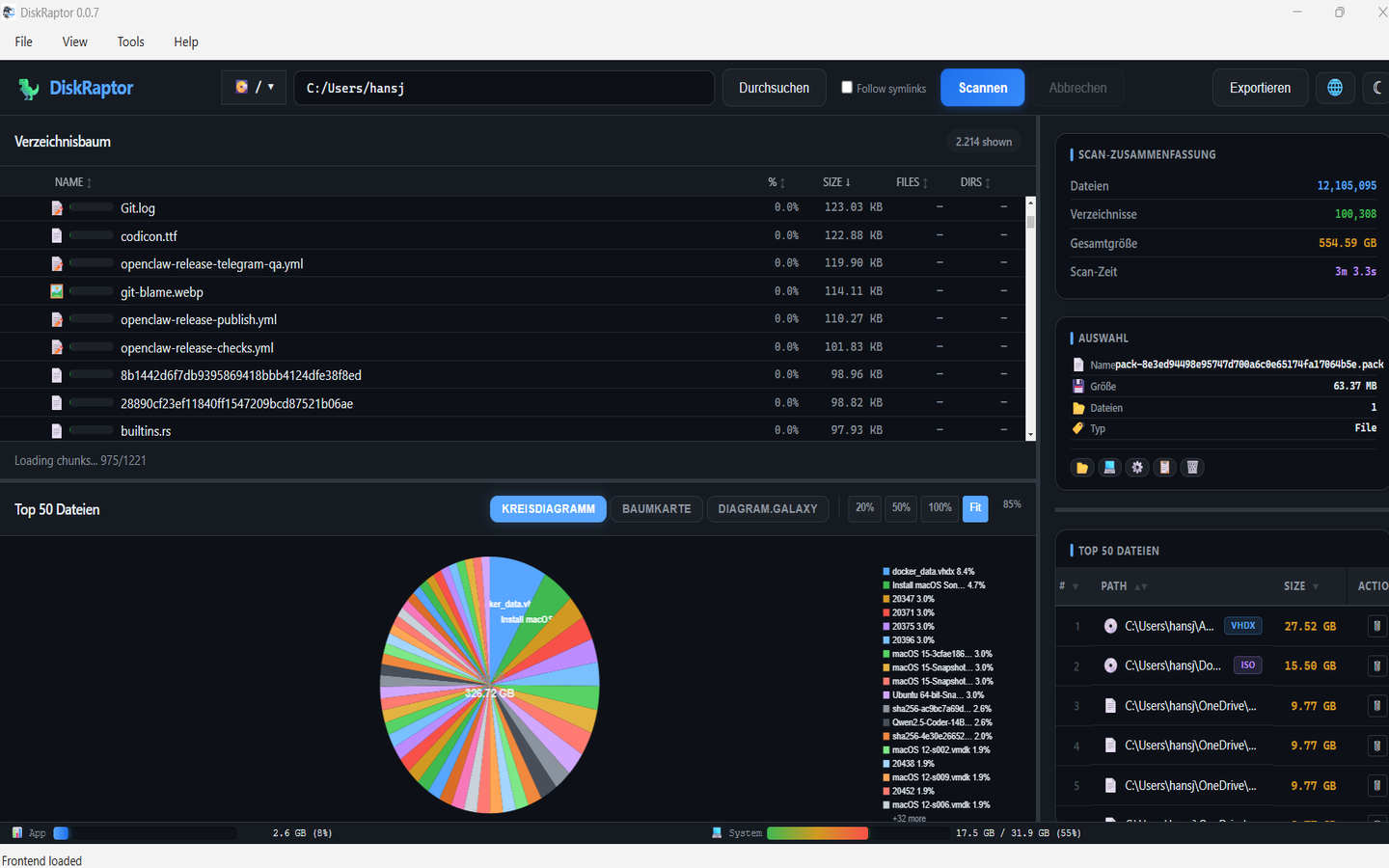
What we liked most is how the tutorial translates the layout into everyday terms. The tree view is described as a folder and file list where each row shows a name, a size and a colored bar whose length shows how large the item is compared with its parent folder. The diagram panel is presented as four ways to look at the same results, each with a clear purpose:
- Pie chart — a quick overview of the 50 largest files
- Treemap — nested folders as rectangles, so you can see how space is distributed inside each one
- Bar chart — simple side-by-side size comparisons
- Galaxy 3D view — a rotating, immersive look at the biggest files, with a click to jump straight to any of them in the tree
The guide also covers the small things that make the app comfortable to use: hover tooltips on every shape, click-to-jump between chart and tree, arrow-key navigation with Enter to open a file, resizable panels, and a dark/light switch that remembers your choice.
A complete real-world walkthrough
Our favorite part is the practical example: a Downloads folder that has grown to 45 GB. The tutorial follows a full cleanup from start to finish — spot an 18 GB Old Projects folder in the treemap, jump to it in the tree, rescan just that folder, send three already-watched videos to the trash, run the duplicate finder to catch five identical installers, and remove twelve leftover empty folders. The result: 22 GB freed in under five minutes. That is exactly the workflow DiskRaptor was built for, told without a single unexplained click.
The tools beyond the charts
The guide doesn't stop at visualization. It also explains the built-in utilities in the same plain tone: Find Duplicates, which compares file content with the fast xxhash3 hash instead of trusting file names and therefore catches renamed copies; Trash Recovery for restoring something deleted by mistake; Empty Folders; Find Files for searching scan results by name pattern; and the File Type Filter for cleaning up one category — images, video, audio, archives or PDFs — at a time. It even covers exporting results as a standalone HTML report or as CSV/JSON for spreadsheets and other tools.
Even the edge cases
What makes this tutorial stand out is that it prepares readers for the awkward moments, too. It explains the scan-timeout watchdog: the default is 120 seconds, it can be set anywhere from 0 to 3600 seconds, and 0 disables it entirely for very slow external drives. If a scan does time out, DiskRaptor shows the last active folders and any operating-system errors, and the retry is always manual — with the timeout doubled — so the user stays in control. The troubleshooting section then covers locked or disconnected drives, folders skipped because of permissions, very large scans on older hardware, and accidental deletions.
Thank you, Mediaket, for taking the time to explain DiskRaptor properly — and for making that explanation available in three languages. Guides like this are how free software becomes approachable. 💙
Try DiskRaptor
Free, open source, cross-platform — available as a direct download, on the Microsoft Store, the Mac App Store, and via GitHub for Linux.